(Page créée avec « {{ {{tntn|Tuto Details}} |SourceLanguage=none |Language=fr |IsTranslation=0 |Main_Picture=Porte-bijoux_image20171121_172101576_resultat.jpg |Licences=Attribution (CC BY) |... ») |
(update property name) |
||
| (4 révisions intermédiaires par 3 utilisateurs non affichées) | |||
| Ligne 1 : | Ligne 1 : | ||
| − | {{ | + | {{Tuto Details |
| − | |||
| − | |||
| − | |||
|Main_Picture=Porte-bijoux_image20171121_172101576_resultat.jpg | |Main_Picture=Porte-bijoux_image20171121_172101576_resultat.jpg | ||
|Licences=Attribution (CC BY) | |Licences=Attribution (CC BY) | ||
| − | |Description=<translate>Porte-bijoux</translate> | + | |Description=<translate><!--T:1--> Porte-bijoux en bois.</translate> |
|Area=Decoration | |Area=Decoration | ||
|Type=Creation | |Type=Creation | ||
| Ligne 13 : | Ligne 10 : | ||
|Cost=25 | |Cost=25 | ||
|Currency=EUR (€) | |Currency=EUR (€) | ||
| − | |Tags=porte, bijoux, porte-bijoux, lasercut | + | |Tags=porte, bijoux, porte-bijoux, lasercut, Bois, Laser, Découpeuse laser |
| + | |SourceLanguage=none | ||
| + | |Language=fr | ||
| + | |IsTranslation=0 | ||
}} | }} | ||
| − | {{ | + | {{Introduction |
| − | |Introduction=<translate>Création d'un porte-bijoux personnalisé pour le marché de | + | |Introduction=<translate><!--T:2--> Création d'un porte-bijoux personnalisé pour le marché de Noël 2017.</translate> |
}} | }} | ||
| − | {{ | + | {{Materials |
| − | |Material=<translate>Planche contreplaqué 4mm peuplier</translate> | + | |Material=<translate><!--T:3--> * Planche contreplaqué 4mm peuplier</translate> |
| − | |Tools=<translate> | + | |Tools=<translate><!--T:4--> |
| − | + | * Inkscape | |
| − | + | * Jobcontrol | |
| − | + | * Lasercut (speedy 400)</translate> | |
| − | + | |Tuto_Attachments={{Tuto Attachments | |
| − | |Tuto_Attachments={{ | + | |Attachment=Porte-Bijoux.svg |
| − | |Attachment= | ||
}} | }} | ||
}} | }} | ||
| − | {{ | + | {{Separator}} |
| − | {{ | + | {{Tuto Step |
| − | |Step_Title=<translate>Inkscape + dessin</translate> | + | |Step_Title=<translate><!--T:7--> Inkscape + dessin</translate> |
| − | |Step_Content=<translate>Création du porte-bijoux avec Inkcape | + | |Step_Content=<translate><!--T:8--> |
| + | Création du porte-bijoux avec Inkcape. | ||
| + | <!--T:9--> | ||
{{Pin|Trait rouge pur en 0.1px ou 0.08pt}}</translate> | {{Pin|Trait rouge pur en 0.1px ou 0.08pt}}</translate> | ||
|Step_Picture_00=Porte-bijoux_porte-bijoux.png | |Step_Picture_00=Porte-bijoux_porte-bijoux.png | ||
}} | }} | ||
| − | {{ | + | {{Tuto Step |
| − | |Step_Title=<translate>Découpe | + | |Step_Title=<translate><!--T:10--> Découpe laser</translate> |
| − | |Step_Content=<translate>= Découpe = | + | |Step_Content=<translate>= Découpe = <!--T:11--> |
* Puissance : 100 | * Puissance : 100 | ||
* Vitesse : 0.6 | * Vitesse : 0.6 | ||
* Fréquence : 1000 Hz | * Fréquence : 1000 Hz | ||
| − | = Gravure = | + | = Gravure = <!--T:12--> |
* Puissance : 50 | * Puissance : 50 | ||
* Vitesse : 50</translate> | * Vitesse : 50</translate> | ||
| − | |Step_Picture_00=Porte- | + | |Step_Picture_00=Porte-bijoux_d_coupeuse_laser.png |
| − | | | + | }} |
| − | | | + | {{Tuto Step |
| − | | | + | |Step_Title=<translate><!--T:13--> Résultat final</translate> |
| + | |Step_Content=<translate><!--T:14--> Et voilà !</translate> | ||
| + | |Step_Picture_00=Porte-bijoux_image20171116_153444796_resultat.jpg | ||
| + | |Step_Picture_01=Porte-bijoux_image20171116_153437860_resultat.jpg | ||
| + | |Step_Picture_02=Porte-bijoux_image20171116_153433395_resultat.jpg | ||
}} | }} | ||
| − | {{ | + | {{Notes |
| − | |Notes=<translate></translate> | + | |Notes=<translate><!--T:15--> Une création de [[Group:YourLAB - FabLab d'Andenne|YourLAB - FabLab d'Andenne]].</translate> |
}} | }} | ||
| − | {{ | + | {{Tuto Status |
|Complete=Published | |Complete=Published | ||
}} | }} | ||
Version actuelle datée du 9 décembre 2019 à 12:50
Porte-bijoux en bois.


Difficulté
Facile
Durée
2 heure(s)
Catégories
Décoration
Coût
25 EUR (€)
Introduction
Création d'un porte-bijoux personnalisé pour le marché de Noël 2017.
Matériaux
- Planche contreplaqué 4mm peuplier
Outils
- Inkscape
- Jobcontrol
- Lasercut (speedy 400)
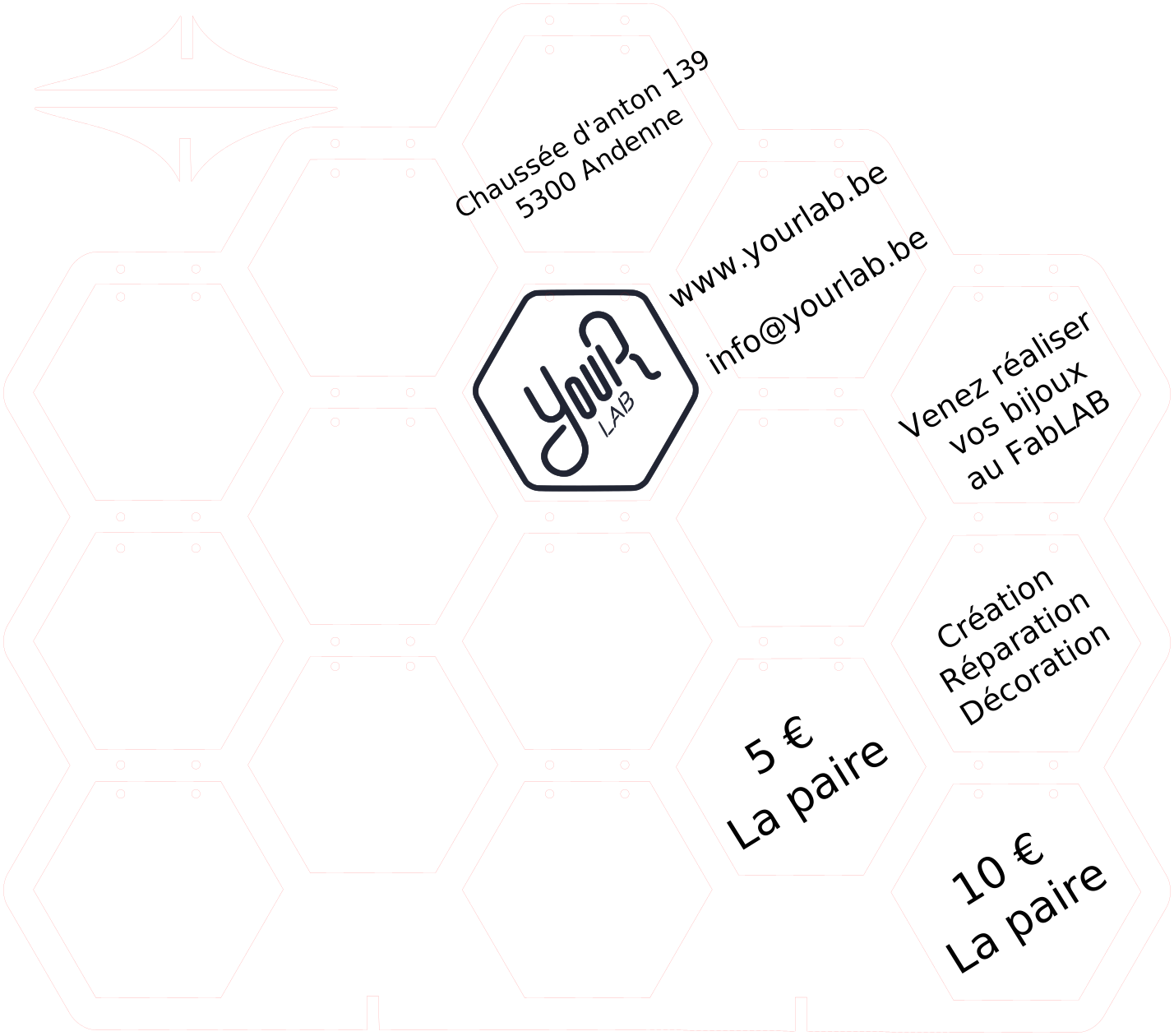
Étape 1 - Inkscape + dessin
Création du porte-bijoux avec Inkcape.

Étape 2 - Découpe laser
Découpe
- Puissance : 100
- Vitesse : 0.6
- Fréquence : 1000 Hz
Gravure
- Puissance : 50
- Vitesse : 50

Étape 3 - Résultat final
Et voilà !


Notes et références
Une création de YourLAB - FabLab d'Andenne.
Published
 Français
 English
 Deutsch
 Español
 Italiano
 Português